

如何在Ubuntu 20.04 LTS上安装SpiderFoot
admin
2023-07-31 07:33:31
0次
在Ubuntu 20.04 LTS Focal Fossa上安装SpiderFoot
步骤1.首先,通过apt在终端中运行以下命令来确保所有系统软件包都是最新的。
sudo apt update
sudo apt upgrade
第2步。安装Python。
SpiderFoot用Python编写,需要安装在您的系统上:
sudo apt install python3 python3-pip
步骤3.在Ubuntu 20.04上安装SpiderFoot。
现在,我们从Git存储库下载最新版本的Spiderfoot:
wget https://github.com/smicallef/spiderfoot/archive/v3.3.tar.gz
接下来,解压缩下载的档案:
tar -xvzf v3.3.tar.gz
cd spiderfoot-3.3
pip3 install -r requirements.txt
安装后,您可以使用以下命令列出SpiderFoot可用的所有选项:
python3 sf.py --help
您应该获得以下输出:
usage: sf.py [-h] [-d] [-l IP:port] [-m mod1,mod2,...] [-M] [-s TARGET] [-t type1,type2,...] [-T] [-o tab|csv|json] [-H] [-n] [-r]
             [-S LENGTH] [-D DELIMITER] [-f] [-F type1,type2,...] [-x] [-q]

SpiderFoot 3.3: Open Source Intelligence Automation.

optional arguments:
  -h, --help          show this help message and exit
  -d, --debug         Enable debug output.
  -l IP:port          IP and port to listen on.
  -m mod1,mod2,...    Modules to enable.
  -M, --modules       List available modules.
  -s TARGET           Target for the scan.
  -t type1,type2,...  Event types to collect (modules selected automatically).
  -T, --types         List available event types.
  -o tab|csv|json     Output format. Tab is default. If using json, -q is enforced.
  -H                  Don\'t print field headers, just data.
  -n                  Strip newlines from data.
  -r                  Include the source data field in tab/csv output.
  -S LENGTH           Maximum data length to display. By default, all data is shown.
  -D DELIMITER        Delimiter to use for CSV output. Default is ,.
  -f                  Filter out other event types that weren\'t requested with -t.
  -F type1,type2,...  Show only a set of event types, comma-separated.
  -x                  STRICT MODE. Will only enable modules that can directly consume your target, and if -t was specified only those events
                      will be consumed by modules. This overrides -t and -m options.
  -q                  Disable logging. This will also hide errors!
SpiderFoot还具有Web界面。在Web UI上运行以下命令:
python3 sf.py -l localhost:5001
上面的命令使SpiderFoot可以从浏览器访问。打开浏览器,浏览到服务器主机名或IP地址,后跟端口5001 。http://192.168.77.21:8080
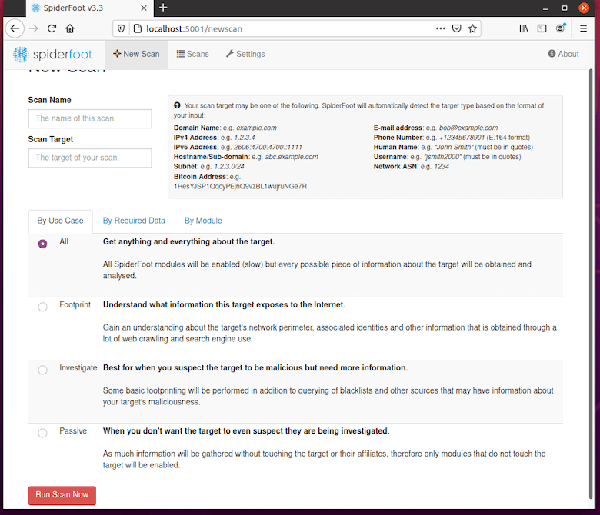
默认情况下,无需任何身份验证即可访问SpiderFoot。因此建议启用基本身份验证。运行以下命令以将您的用户名和密码添加到密码文件中:
echo \"admin:Your-Strong-Password\" > passwd
恭喜你!您已经成功安装了SpiderFoot。感谢您使用本教程在Ubuntu 20.04 LTS Focal Fossa系统上安装SpiderFoot。有关其他帮助或有用信息,建议您访问SpiderFoot官方网站。
相关内容
热门资讯
Windows 11 和 10...
Windows 11/10 文件夹属性中缺少共享选项卡 – 已修复
1.检查共享选项卡是否可用
右键...
事件 ID 7034:如何通过...
点击进入:ChatGPT工具插件导航大全 服务控制管理器 (SCM) 负责管理系统上运行的服务的活动...
Radmin VPN Wind...
Radmin VPN 是一款免费且用户友好的软件,旨在牢固地连接计算机以创建一个有凝聚力的虚拟专用网...
Hive OS LOLMine...
目前不清退的交易所推荐:
1、全球第二大交易所OKX欧意
国区邀请链接: https://www.m...
Hive OS 新建飞行表的方...
目前不清退的交易所推荐:
1、全球第二大交易所OKX欧意
国区邀请链接: https://www.m...
Hive OS 部署 PXE ...
目前不清退的交易所推荐:
1、全球第二大交易所OKX欧意
国区邀请链接: https://www.m...
如何在 Windows 11 ...
在对 Windows 注册表编辑器进行任何更改之前,强烈建议备份您的注册表设置。如果出现问题,您始终...
Hive OS A卡超频VII...
目前不清退的交易所推荐:
1、全球第二大交易所OKX欧意
国区邀请链接: https://www.m...
如何修复 Steam 内容文件...
Steam 内容文件锁定是当您的 Steam 文件无法自行更新时出现的错误。解决此问题的最有效方法之...
如何在Instagram上扫描...
如何在Instagram上扫描名称标签/ QR?
总而言之,您可以通过大约四种不同的方法来扫描这些I...