

如何在Ubuntu 20.04 LTS上安装Bitwarden
admin
2023-07-31 07:04:56
0次
在Ubuntu 20.04 LTS Focal Fossa上安装Bitwarden
步骤1.首先,通过apt在终端中运行以下命令来确保所有系统软件包都是最新的。
sudo apt update
sudo apt upgrade
步骤2.安装必需的依赖项。
我们需要在您的服务器中安装一些依赖项:
sudo apt install apt-transport-https ca-certificates curl gnupg-agent software-properties-common
步骤3.安装Docker。
Bitwarden将使用一系列Docker容器部署并在您的计算机上运行。Bitwarden将与Docker社区(免费)和企业版同样出色地工作:
curl -fsSL https://download.docker.com/linux/ubuntu/gpg | apt-key add -
接下来,使用以下命令添加Docker存储库:
add-apt-repository \"deb [arch=amd64] https://download.docker.com/linux/ubuntu $(lsb_release -cs) stable\"
完成后,使用以下命令安装Docker和Docker Compose:
sudo apt install docker-ce docker-ce-cli containerd.io docker-compose
步骤4.在Ubuntu 20.04上安装Bitwarden Password Manager。
现在,我们从其官方网站下载Bitwarden安装脚本:
curl -Lso bitwarden.sh https://go.btwrdn.co/bw-sh
chmod +x bitwarden.sh
在安装Bitwarden之前,您需要输入您的电子邮件ID,然后单击“提交”。这样的页面已加载。
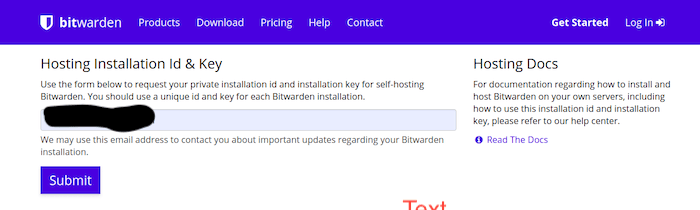
之后,使用以下命令启动Bitwarden安装:
./bitwarden.sh install
输入系统主机名:
_     _ _                         _
| |__ (_) |___      ____ _ _ __ __| | ___ _ __
| \'_ \\| | __\\ \\ /\\ / / _` | \'__/ _` |/ _ \\ \'_ \\
| |_) | | |_ \\ V  V / (_| | | | (_| |  __/ | | |
|_.__/|_|\\__| \\_/\\_/ \\__,_|_|  \\__,_|\\___|_| |_|
Open source password management solutions
Copyright 2015-2020, 8bit Solutions LLC
https://bitwarden.com, https://github.com/bitwarden
===================================================
Docker version 19.03.12, build 48a66213fe
docker-compose version 1.25.0, build unknown
(!) Enter the domain name for your Bitwarden instance (ex. bitwarden.example.com): 192.168.77.21
(!) Do you want to use Let\'s Encrypt to generate a free SSL certificate? (y/n): n
1.36.1: Pulling from bitwarden/setup
6ec8c9369e08: Pull complete
fe8522826504: Pull complete
658bf4619169: Pull complete
0392978bbc2e: Pull complete
33dd02257803: Pull complete
2a69859c8164: Pull complete
d68079cd71ee: Pull complete
7c08df4e94b0: Pull complete
653a8af878c4: Pull complete
d252f877c4a2: Pull complete
Digest: sha256:5b2c43b46c03da54aecc6d19098b0pengen019725kimpoif29
Status: Downloaded newer image for bitwarden/setup:1.36.1
docker.io/bitwarden/setup:1.36.1
(!) Enter your installation id (get at https://bitwarden.com/host): bmwe46325e-f0e7-47cf-9667-ac0f008645b9
(!) Enter your installation key: tloMmeilanamariaSC5
(!) Do you have a SSL certificate to use? (y/n): n
(!) Do you want to generate a self-signed SSL certificate? (y/n): y
Generating self signed SSL certificate.
Generating a RSA private key
........................++++
..................++++
writing new private key to \'/bitwarden/ssl/self/69.87.216.49/private.key\'
-----
Generating key for IdentityServer.
Generating a RSA private key
.........++++
.......................++++
writing new private key to \'identity.key\'
-----
!!!!!!!!!! WARNING !!!!!!!!!!
You are using an untrusted SSL certificate. This certificate will not be
trusted by Bitwarden client applications. You must add this certificate to
the trusted store on each device or else you will receive errors when trying
to connect to your installation.
Building nginx config.
Building docker environment files.
Building docker environment override files.
Building FIDO U2F app id.
Building docker-compose.yml.
Installation complete
If you need to make additional configuration changes, you can modify
the settings in `./bwdata/config.yml` and then run:
`./bitwarden.sh rebuild` or `./bitwarden.sh update`
Next steps, run:
`./bitwarden.sh start`
安装完成后,使用以下命令启动Bitwarden服务:
./bitwarden.sh start
步骤5.访问Bitwarden Web界面。
现在,您可以使用URL访问Web界面Bitwarden 。您应该看到Bitwarden登录屏幕:http://your-server-ip
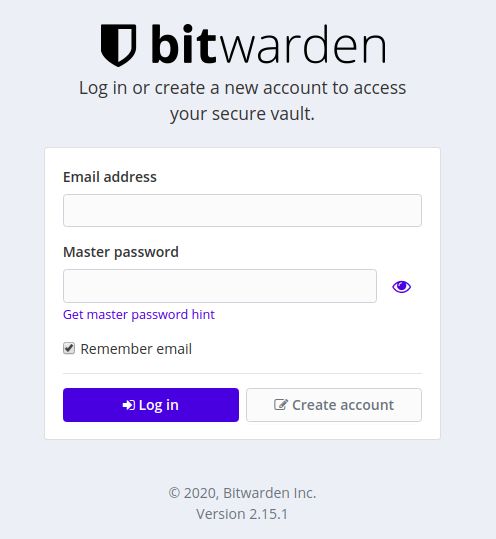

恭喜你!您已成功安装Bitwarden。感谢您使用本教程在Ubuntu 20.04 Focal Fossa上安装Bitwarden Password Manager。有关其他帮助或有用信息,我们建议您检查Bitwarden官方网站。
相关内容
热门资讯
Windows 11 和 10...
Windows 11/10 文件夹属性中缺少共享选项卡 – 已修复
1.检查共享选项卡是否可用
右键...
事件 ID 7034:如何通过...
点击进入:ChatGPT工具插件导航大全 服务控制管理器 (SCM) 负责管理系统上运行的服务的活动...
Radmin VPN Wind...
Radmin VPN 是一款免费且用户友好的软件,旨在牢固地连接计算机以创建一个有凝聚力的虚拟专用网...
Hive OS LOLMine...
目前不清退的交易所推荐:
1、全球第二大交易所OKX欧意
国区邀请链接: https://www.m...
Hive OS 新建飞行表的方...
目前不清退的交易所推荐:
1、全球第二大交易所OKX欧意
国区邀请链接: https://www.m...
如何在 Windows 11 ...
在对 Windows 注册表编辑器进行任何更改之前,强烈建议备份您的注册表设置。如果出现问题,您始终...
Hive OS 部署 PXE ...
目前不清退的交易所推荐:
1、全球第二大交易所OKX欧意
国区邀请链接: https://www.m...
如何在Instagram上扫描...
如何在Instagram上扫描名称标签/ QR?
总而言之,您可以通过大约四种不同的方法来扫描这些I...
Hive OS A卡超频VII...
目前不清退的交易所推荐:
1、全球第二大交易所OKX欧意
国区邀请链接: https://www.m...
如何修复 Steam 内容文件...
Steam 内容文件锁定是当您的 Steam 文件无法自行更新时出现的错误。解决此问题的最有效方法之...