

如何在 Ubuntu 22.04 LTS 上安装 GitLab
admin
2023-07-31 03:27:12
0次
GitLab 是一个基于 Web 的 Git 存储库,它充当版本控制系统。GitLab 的主要优势之一是您可以根据您的要求管理Git存储库,例如保持信息公开/私密。
在 Ubuntu 22.04 LTS Jammy Jellyfish 上安装 GitLab
apt步骤 1. 首先,通过在终端中运行以下命令,确保所有系统包都是最新的。
sudo apt update
sudo apt upgrade
sudo apt install build-essential curl file git ca-certificates
步骤 2. 在 Ubuntu 22.04 上安装 GitLab。
默认情况下,GitLab 在 Ubuntu 22.04 基础存储库中不可用。现在运行以下命令将 GitLab 存储库添加到您的 Ubuntu 系统:
curl -sS https://packages.gitlab.com/install/repositories/gitlab/gitlab-ce/script.deb.sh | sudo bash
接下来,使用以下命令下载 Gitlab 包:
wget --content-disposition https://packages.gitlab.com/gitlab/gitlab-ce/packages/ubuntu/bionic/gitlab-ce_14.1.2-ce.0_amd64.deb/download.deb
然后,使用以下命令安装下载的 .deb 包:
dpkg -i gitlab-ce_14.1.2-ce.0_amd64.deb
输出:
root@idroot.us:~#dpkg -i gitlab-ce_14.1.2-ce.0_amd64.deb
Selecting previously unselected package gitlab-ce.
(Reading database ... 73374 files and directories currently installed.)
Preparing to unpack gitlab-ce_14.1.2-ce.0_amd64.deb ...
Unpacking gitlab-ce (14.1.2-ce.0) ...
Setting up gitlab-ce (14.1.2-ce.0) ...
It looks like GitLab has not been configured yet; skipping the upgrade script.

       *.                  *.
      ***                 ***
     *****               *****
    .******             *******
    ********            ********
   ,,,,,,,,,***********,,,,,,,,,
  ,,,,,,,,,,,*********,,,,,,,,,,,
  .,,,,,,,,,,,*******,,,,,,,,,,,,
      ,,,,,,,,,*****,,,,,,,,,.
         ,,,,,,,****,,,,,,
            .,,,***,,,,
                ,*,.

     _______ __  __          __
    / ____(_) /_/ /   ____ _/ /_
   / / __/ / __/ /   / __ `/ __ \\
  / /_/ / / /_/ /___/ /_/ / /_/ /
  \\____/_/\\__/_____/\\__,_/_.___/

Thank you for installing GitLab!
完成后,通过运行以下命令启动 GitLab 实例:
gitlab-ctl reconfigure
gitlab-ctl start
您还可以通过以下方式获取 GitLab 服务的状态:
gitlab-ctl status
步骤 3. 配置防火墙。
Ubuntu 22.04ufw默认运行防火墙。通过端口 HTTP 和 HTTPS 启用连接:
sudo ufw allow https
sudo ufw allow http
sudo ufw allow ssh
sudo ufw enable
sudo ufw status
第 4 步。访问 GitLab Web 界面。
成功安装后,打开您的 Web 浏览器并使用 URL 访问 GitLab Web 界面。您将被重定向到以下页面:http://Your-IP-address
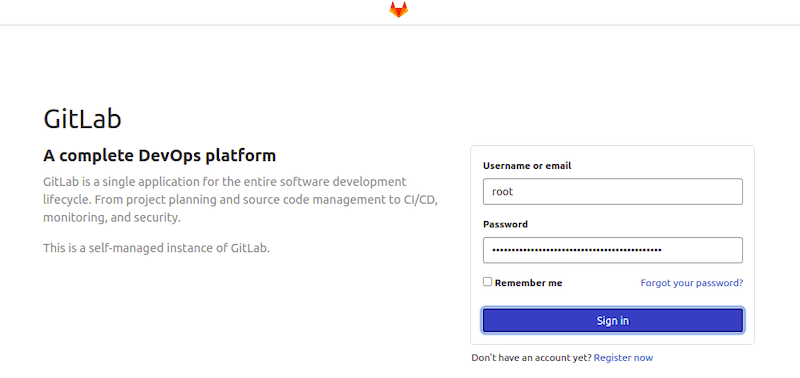

感谢您使用本教程在 Ubuntu 22.04 LTS Jammy Jellyfish 系统上安装 GitLab。如需更多帮助或有用信息,我们建议您查看GitLab 官方网站。
相关内容
热门资讯
Windows 11 和 10...
Windows 11/10 文件夹属性中缺少共享选项卡 – 已修复
1.检查共享选项卡是否可用
右键...
事件 ID 7034:如何通过...
点击进入:ChatGPT工具插件导航大全 服务控制管理器 (SCM) 负责管理系统上运行的服务的活动...
Radmin VPN Wind...
Radmin VPN 是一款免费且用户友好的软件,旨在牢固地连接计算机以创建一个有凝聚力的虚拟专用网...
Hive OS LOLMine...
目前不清退的交易所推荐:
1、全球第二大交易所OKX欧意
国区邀请链接: https://www.m...
如何修复 Steam 内容文件...
Steam 内容文件锁定是当您的 Steam 文件无法自行更新时出现的错误。解决此问题的最有效方法之...
Hive OS 部署 PXE ...
目前不清退的交易所推荐:
1、全球第二大交易所OKX欧意
国区邀请链接: https://www.m...
如何在Instagram上扫描...
如何在Instagram上扫描名称标签/ QR?
总而言之,您可以通过大约四种不同的方法来扫描这些I...
在 Windows 11 中打...
什么是链路状态电源管理?
您可以在系统控制面板的电源选项中看到链接状态电源管理。它是 PCI Exp...
Hive OS 新建飞行表的方...
目前不清退的交易所推荐:
1、全球第二大交易所OKX欧意
国区邀请链接: https://www.m...
farols1.1.501.0...
faro ls 1.1.501.0(64bit)可以卸载,是一款无需连接外部PC机或笔记本计算机即可...