

如何在Ubuntu 20.04 LTS上安装Gitea
在Ubuntu 20.04 LTS Focal Fossa上安装Gitea
步骤1.首先,通过apt在终端中运行以下命令来确保所有系统软件包都是最新的。
sudo apt update
sudo apt upgrade
步骤2.安装Git和创建Git用户。
运行命令以在Ubuntu上安装Git软件包:
sudo apt install git
确认Git安装:
[root@idroot.us ~]# git --version
git version 2.25.1
安装Git之后,现在我们创建一个Git用户来运行Gitea服务:
sudo adduser --system --group --disabled-password --shell /bin/bash --home /home/git --gecos \'Git Version Control\' git
步骤3.在Ubuntu上安装MariaDB。
您可以使用以下命令在Ubuntu 20.04 LTS系统上安装MySQL:
sudo apt install mariadb-server mariadb-client
安装服务器后,以下命令可用于停止,启动和重新启动数据库服务:
sudo systemctl stop mariadb.service
sudo systemctl start mariadb.service
sudo systemctl restart mariadb.service
让我们确认我们在Ubuntu 20.04上的MariaDB服务器安装:
mysql -V
现在,我们在安装后确保MariaDB的安全。
默认情况下,不会对MariaDB进行加固。您可以使用mysql_secure_installation脚本保护MariaDB 。您应该仔细阅读每个步骤,并在每个步骤下面仔细进行操作,这将设置root密码,删除匿名用户,禁止远程root登录以及删除测试数据库和对安全MariaDB的访问权限:
mysql_secure_installation
像这样配置它:
- Set root password? [Y/n] y
- Remove anonymous users? [Y/n] y
- Disallow root login remotely? [Y/n] y
- Remove test database and access to it? [Y/n] y
- Reload privilege tables now? [Y/n] y
要登录MariaDB,请使用以下命令(请注意,该命令与登录MySQL数据库所用的命令相同)并为Gitea创建数据库:
$ mysql -u root -p

CREATE DATABASE giteadb;
CREATE USER \'giteauser\'@\'localhost\' IDENTIFIED BY \'your_passwd\';
GRANT ALL ON giteadb.* TO \'giteauser\'@\'localhost\' IDENTIFIED BY \'user_passwd_here\' WITH GRANT OPTION;
FLUSH PRIVILEGES;
EXIT;
步骤4.在Ubuntu 20.04上安装Gitea。
现在从Git存储库下载最新版本的Gitea二进制文件。您可以使用以下命令下载它:
sudo wget -O /tmp/gitea https://dl.gitea.io/gitea/1.12.5/gitea-1.12.5-linux-amd64
将二进制文件复制到全局位置:
sudo mv /tmp/gitea /usr/local/bin
使二进制文件可执行:
sudo chmod +x /usr/local/bin/gitea
接下来,创建目录并设置所需的权限和所有权:
sudo mkdir -p /var/lib/gitea/{custom,data,indexers,public,log}
sudo chown git: /var/lib/gitea/{data,indexers,log}
sudo chmod 750 /var/lib/gitea/{data,indexers,log}
sudo mkdir /etc/gitea
sudo chown root:git /etc/gitea
sudo chmod 770 /etc/gitea
步骤4.为Gitea创建Systemd服务。
现在,您必须systemd在目录中为Gitea创建服务文件gitea.service :/etc/systemd/system/
sudo nano /etc/systemd/system/gitea.service
将以下内容粘贴到文件中并保存:
[Unit]
Description=Gitea (Git with a cup of tea)
After=syslog.target
After=network.target
#After=mysqld.service

[Service]
# Modify these two values and uncomment them if you have
# repos with lots of files and get an HTTP error 500 because
# of that
###
#LimitMEMLOCK=infinity
#LimitNOFILE=65535
RestartSec=2s
Type=simple
User=git
Group=git
WorkingDirectory=/var/lib/gitea/
ExecStart=/usr/local/bin/gitea web -c /etc/gitea/app.ini
Restart=always
Environment=USER=git HOME=/home/git GITEA_WORK_DIR=/var/lib/gitea
# If you want to bind Gitea to a port below 1024 uncomment
# the two values below
###
#CapabilityBoundingSet=CAP_NET_BIND_SERVICE
#AmbientCapabilities=CAP_NET_BIND_SERVICE

[Install]
WantedBy=multi-user.target
然后,启用并启动Gitea服务:
sudo systemctl daemon-reload
sudo systemctl enable gitea
sudo systemctl start gitea
步骤5.访问Gitea Web界面。
现在,打开Web浏览器并访问。您应该看到以下页面:http://YOUR_DOMAIN_OR_IP_ADDRESS:3000
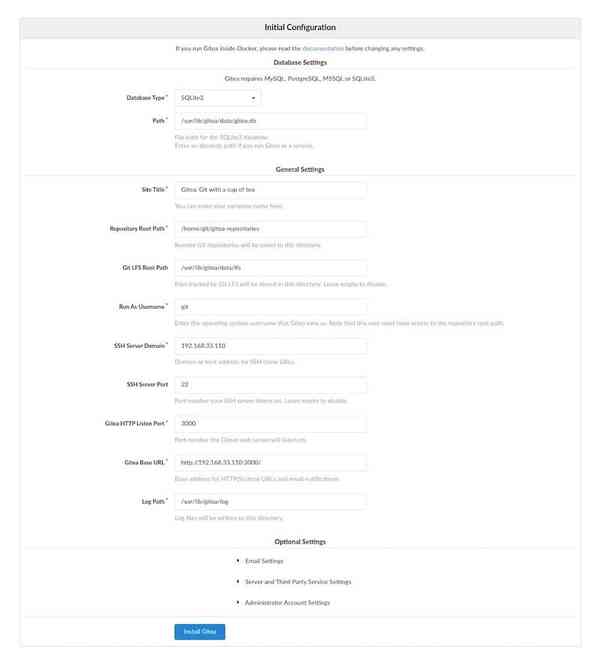
恭喜你!您已经成功安装了Gitea。使用本教程在Ubuntu 20.04 LTS Focal Fossa系统上安装Gitea。有关其他帮助或有用信息,建议您检查Gitea官方网站。