

如何在 Debian 11 上安装 MySQL
admin
2023-07-31 20:43:00
0次
MySQL 是一个基于 SQL(结构化查询语言)的关系数据库管理系统。它是使用它的几个众所周知的应用程序中使用最广泛的数据库软件之一。MariaDB 可用作 Debian 11 中的默认数据库。因此,您需要在 Debian 11 系统上安装 MySQL 服务器及其所有依赖项。
在 Debian 11 Bullseye 上安装 MySQL
步骤 1. 在我们安装任何软件之前,通过apt在终端中运行以下命令来确保您的系统是最新的很重要:
sudo apt update
sudo apt upgrade
步骤 2. 在 Debian 11 上安装 MySQL。
MySQL 在默认的 Debian 存储库中不可用。您需要在 Debian 11 上安装 MySQL APT 存储库:
wget https://dev.mysql.com/get/mysql-apt-config_0.8.18-1_all.deb
sudo dpkg -i mysql-apt-config_0.8.18-1_all.deb
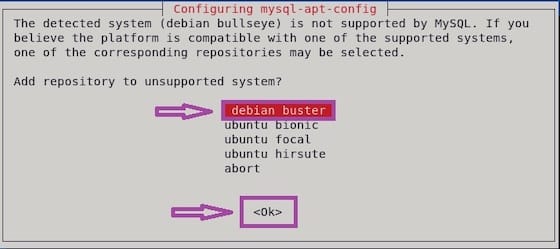
在 MySQL 存储库安装过程中,如果出现提示,请选择 Debian buster 的存储库,然后按 TAB 键选择 Ok。按 ENTER 继续。
接下来,通过运行以下命令更新包列表并安装 MySQL 服务器包:
sudo apt updatesudo apt install mysql-server
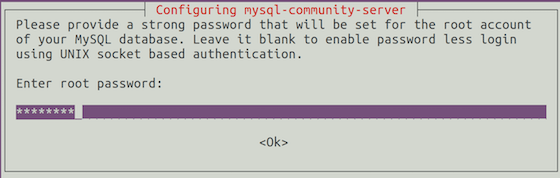
在安装过程中,会出现一个新的弹出窗口,提示您输入数据库 root 密码。

安装完成后,MySQL服务将自动启动,您可以通过键入以下内容进行验证:
sudo systemctl status mysql
步骤 3. 保护 MySQL。
MySQL 安装完成后,您可能需要保护新 MySQL。默认情况下,MySQL 未加固。您可以使用mysql_secure_installation脚本保护 MySQL 。您应该仔细阅读以下每个步骤,这些步骤将设置 root 密码、删除匿名用户、禁止远程 root 登录以及删除测试数据库和访问安全 MySQL:
mysql_secure_installation
像这样配置它:
By default, a MySQL installation has an anonymous user,
allowing anyone to log into MySQL without having to have
a user account created for them. This is intended only for
testing, and to make the installation go a bit smoother.
You should remove them before moving into a production
environment.

Remove anonymous users? (Press y|Y for Yes, any other key for No) : y
Success.

Normally, root should only be allowed to connect from
\'localhost\'. This ensures that someone cannot guess at
the root password from the network.

Disallow root login remotely? (Press y|Y for Yes, any other key for No) : y
Success.

By default, MySQL comes with a database named \'test\' that
anyone can access. This is also intended only for testing,
and should be removed before moving into a production
environment.

Remove test database and access to it? (Press y|Y for Yes, any other key for No) : y
 - Dropping test database...
Success.

 - Removing privileges on test database...
Success.

Reloading the privilege tables will ensure that all changes
made so far will take effect immediately.

Reload privilege tables now? (Press y|Y for Yes, any other key for No) : y
Success.

All done!
要登录 MySQL,请使用以下命令(请注意,它与登录 MySQL 数据库所用的命令相同):
mysql -u root -p
感谢您使用本教程在 Debian 11 Bullseye 上安装最新版本的 MySQL 8。如需其他帮助或有用信息,我们建议您查看MySQL 官方网站。
相关内容
热门资讯
Windows 11 和 10...
Windows 11/10 文件夹属性中缺少共享选项卡 – 已修复
1.检查共享选项卡是否可用
右键...
事件 ID 7034:如何通过...
点击进入:ChatGPT工具插件导航大全 服务控制管理器 (SCM) 负责管理系统上运行的服务的活动...
Radmin VPN Wind...
Radmin VPN 是一款免费且用户友好的软件,旨在牢固地连接计算机以创建一个有凝聚力的虚拟专用网...
Hive OS LOLMine...
目前不清退的交易所推荐:
1、全球第二大交易所OKX欧意
国区邀请链接: https://www.m...
Hive OS 新建飞行表的方...
目前不清退的交易所推荐:
1、全球第二大交易所OKX欧意
国区邀请链接: https://www.m...
如何在 Windows 11 ...
在对 Windows 注册表编辑器进行任何更改之前,强烈建议备份您的注册表设置。如果出现问题,您始终...
Hive OS 部署 PXE ...
目前不清退的交易所推荐:
1、全球第二大交易所OKX欧意
国区邀请链接: https://www.m...
如何在Instagram上扫描...
如何在Instagram上扫描名称标签/ QR?
总而言之,您可以通过大约四种不同的方法来扫描这些I...
Hive OS A卡超频VII...
目前不清退的交易所推荐:
1、全球第二大交易所OKX欧意
国区邀请链接: https://www.m...
如何修复 Steam 内容文件...
Steam 内容文件锁定是当您的 Steam 文件无法自行更新时出现的错误。解决此问题的最有效方法之...