

Hive OS操作系统实时更换的方法和教程
目前不清退的交易所推荐:
1、全球第二大交易所OKX欧意
国区邀请链接: https://www.myts3cards.com/cn/join/1837888 币种多,交易量大!
国际邀请链接:https://www.okx.com/join/1837888 注册简单,交易不需要实名,新用户能开合约,币种多,交易量大!
2、老牌交易所比特儿现改名叫芝麻开门 :https://www.gate.win/signup/649183
Hive OS邀请码:1261917
国区注册链接:https://hiveos.farm
使用hive-replace脚本,您可以即时用 Hive 替换正在运行的 Linux。您可以在任何标准的 Ubuntu 或其他竞争对手的挖矿操作系统上运行它。这也可用于替换/升级正在运行的 Hive 安装上的系统。
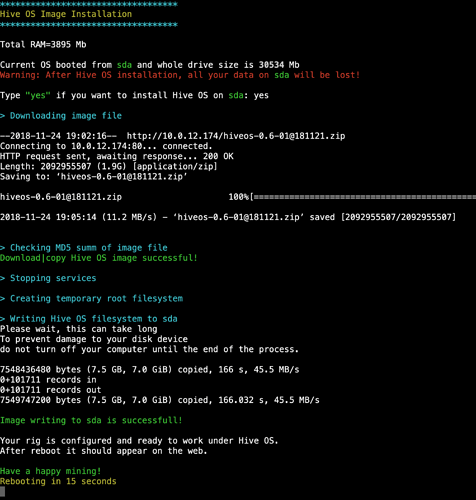
成功写入后,您将使用新系统重新启动。这是它的样子:
在你开始之前
理想情况下,您应该下载系统映像 ZIP 文件和 VERSIONS.txt。然后通过 HTTP、FTP、NFS、SMB (Windows) 使它们在您的本地网络上可用。是的,可以从官方存储库提供图像 URL,但下载速度会很慢,而且据说最好将其存储在本地网络中。
如果您从 Hive 运行它,那么当前rig.conf将被保留。在其他 Linux 上FARM_HASH会被问到。
运行此命令的最佳方式是使用直接 SSH 连接(来自其他 Linux/Mac 或来自 Windows 的 Putty)。ShellInABox 应该可以工作。OpenVPN 连接也可以。Teleconsole 连接将关闭,因此您将看不到进度。
警告:此命令可能会破坏您的系统安装。因此,请在物理关闭矿机时进行一些实验。
使用说明
您需要从 Web 更新 Hive 以获取最新的脚本版本。如果您正在运行其他 Linux,则应从Git 存储库下载该脚本。
cd /tmp
wget https://raw.githubusercontent.com/minershive/hiveos-linux/master/hive/sbin/hive-replace
chmod +x hive-replace
以下是一般使用说明:
Usage: hive-replace [option] <-Path or URL to ZIP file with Hive OS image->

Options:
  -y|--yes                    Do not ask for confirmation, answer yes to all questions
  -f|--force                  Forced replace. Do not check the checksum of ZIP archive. Use with caution!
  --nfs                       To use NFS Shared resource. e.g.: IP_NFS_server:/shared_dir/hive_zip
  --smb                       To use Windows Shared resource. e.g.: //IP_Windows_comp/shared_folder/hive_zip
  --smbuser=Windows user      UserName for Windows Shared resource. Do not set this option for guest/anonymous access
  --smbpass=Windows password  Password for Windows Shared resource. Do not set this option for guest/anonymous access
  --hash=FARM_HASH            FARM_HASH from Web-interface
  -h|--help                   Show this message
例子
通过 HTTP 获取图像:
hive-replace http://192.168.0.100/hiveos-0.6-01@181121.zip
使用本地下载的文件(虽然这没什么意义,但它是可能的):
hive-replace /tmp/hiveos-0.6-01@181121.zip
NFS 网络共享:
hive-replace -y -f --hash=46e9602837d0bda99f0 --nfs 192.168.0.100:/home/john/hive/hiveos-0.6-01@181121.zip
Windows SMB 共享:
hive-replace -y -f --hash=46e9602837d0bda99f0 --smb --smbuser=winuser --smbpass=secret //192.168.0.100/shared_folder/hiveos-0.6-01@181121.zip