

如何在 AlmaLinux 8 上安装 Mantis Bug Tracker

Mantis Bug Tracker (MantisBT) 是一个免费的、开源的、基于 Web 的 bug 跟踪软件编写在 PHP 中。它简单、易于使用、用户友好,并附带了许多工具,可帮助您与团队协作以快速解决错误和问题。它提供了一组丰富的功能,包括通过电子邮件通知、基于角色的访问控制、项目、子项目和类别支持、问题关系图、可定制的仪表板等等。
在 AlmaLinux 8 上安装 Mantis Bug Tracker
步骤 1. 首先,让我们先确保您的系统是最新的。
sudo dnf install epel-release
sudo dnf update
步骤 2. 安装 LAMP 堆栈。
需要一个 AlmaLinux LAMP 服务器。如果您没有安装 LAMP,您可以在此处按照我们的教程进行操作。
步骤 3. 在 AlmaLinux 8 上安装 Mantis Bug Tracker。
现在我们从MantisBT官方页面下载MantisBT最新稳定版:
wget https://sourceforge.net/projects/mantisbt/files/mantis-stable/2.25.2/mantisbt-2.25.2.zip
使用以下命令解压缩下载的文件:
unzip mantisbt-2.25.2.zip
下一个。将提取的文件移动到如下:/var/www/html/
sudo mv mantisbt-2.25.2 /var/www/html/mantisbt
我们需要更改一些文件夹的权限:
sudo chown -R apache:apache /var/www/html/mantisbt
步骤 4. 配置 MariaDB。
默认情况下,MariaDB 未加固。您可以使用mysql_secure_installation脚本保护 MariaDB 。您应该仔细阅读以下每个步骤,这些步骤将设置 root 密码、删除匿名用户、禁止远程 root 登录以及删除测试数据库和访问安全 MariaDB 的权限。
mysql_secure_installation
像这样配置它:
- Set root password? [Y/n] y
- Remove anonymous users? [Y/n] y
- Disallow root login remotely? [Y/n] y
- Remove test database and access to it? [Y/n] y
- Reload privilege tables now? [Y/n] y
接下来,我们需要登录到 MariaDB 控制台并为 Mantis Bug Tracker 创建一个数据库。运行以下命令:
mysql -u root -p
这将提示您输入密码,因此请输入您的 MariaDB 根密码并按 Enter。登录到数据库服务器后,您需要为 Mantis Bug Tracker 安装创建一个数据库:
MariaDB [(none)]> CREATE DATABASE mantisdb;
MariaDB [(none)]> GRANT ALL PRIVILEGES ON mantisdb.* TO \'mantis\'@\'localhost\' IDENTIFIED BY \'your-strong-passwd\';
MariaDB [(none)]> FLUSH PRIVILEGES;
MariaDB [(none)]> EXIT;
步骤 5. 配置 Apache。
现在为 Mantis 创建一个 Apache 虚拟主机配置文件:
sudo nano /etc/httpd/conf.d/mantisbt.conf
添加以下文件:
    DocumentRoot \"/var/www/html/mantisbt\"

    ServerNamemantisbt.your-domain.com ErrorLog \"/var/log/httpd/mantisbt_error_log\"
    CustomLog \"/var/log/httpd/mantisbt_access_log\" combined


            DirectoryIndex index.php
            Options -Indexes +FollowSymLinks
            AllowOverride All
            Require all granted
完成后保存并关闭文件,然后重新启动 Apache 服务以应用更改:
sudo a2ensite mantisbt.conf
sudo a2enmod rewrite
sudo systemctl restart httpd
步骤 6. 配置防火墙。
允许端口 80 和 443 通过防火墙:
sudo firewall-cmd --permanent --add-service=http
sudo firewall-cmd --permanent --add-service=https
sudo firewall-cmd --reload
然后,使用以下命令配置SELinux:
sudo setsebool httpd_can_network_connect on -P
sudo chcon -R -u system_u -t httpd_sys_rw_content_t -r object_r /var/www/html/mantisbt
步骤 7. 访问 Mantis Bug Tracker Web 界面。
成功安装后,打开 Web 浏览器并使用 URL 访问 Mantis Web 界面。您应该看到以下屏幕:https://mantis.your-domain.com
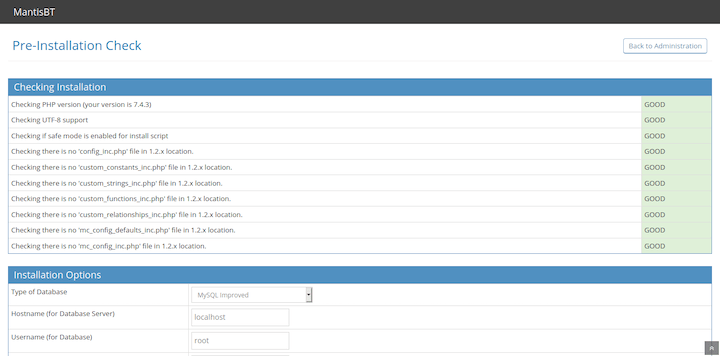

感谢您使用本教程在您的 AlmaLinux 8 系统上安装 Mantis Bug Tracker。如需更多帮助或有用信息,我们建议您查看Mantis 官方网站。