

如何在 Ubuntu 20.04 LTS 上安装 Munin
https://u.jd.com/yK3WRCO
Munin 是一个基于 Web 的工具,用于监控系统和网络统计信息。穆宁通过图表显示了这些信息。它帮助系统管理员收集可通过 Web 界面查看的各种系统信息,例如处理器负载、硬盘使用情况、网络流量、对一台或多台计算机上的服务器服务的访问等。
在 Ubuntu 20.04 LTS Focal Fossa 上安装 Munin
步骤 1. 首先,通过apt在终端中运行以下命令确保所有系统包都是最新的。
sudo apt update
sudo apt upgrade
步骤 2.安装 Apache 和其他依赖项。
运行以下命令来安装 Apache 和其他所需的软件包:
sudo apt install apache2 libcgi-fast-perl libapache2-mod-fcgid
步骤 3. 在 Ubuntu 20.04 上安装 Munin。
默认情况下,Munin 在 Ubuntu 基础存储库上可用,现在使用以下命令将 Munin 安装到您的 Ubuntu 系统:
sudo apt install munin
步骤 4. 配置 Munin。
我们可以从编辑 Munin 配置文件开始:/etc/munin/munin.conf
nano /etc/munin/munin.conf
使用删除取消注释#符号修改以下行:
dbdir /var/lib/munin
htmldir /var/cache/munin/www
logdir /var/log/munin
rundir /var/run/munin
步骤 5. 配置 Apache。
现在我们编辑 Munin 的 Apache 配置:
cd /etc/apache2/conf-enabled
ln -s /etc/munin/apache24.conf munin.conf
确保您注释掉该行 并添加 和(否则您将只能从localhost访问 Munin 输出):Require localRequire all grantedOptions FollowSymLinks SymLinksIfOwnerMatch
nano /etc/munin/apache24.conf
修改以下行:
Alias /munin /var/cache/munin/www# Require localRequire all granted Options FollowSymLinks SymLinksIfOwnerMatch ScriptAlias /munin-cgi/munin-cgi-graph /usr/lib/munin/cgi/munin-cgi-graph# Require localRequire all granted Options FollowSymLinks SymLinksIfOwnerMatch SetHandler fcgid-script SetHandler cgi-script
保存并关闭文件,然后使用以下命令重新启动 Apache 和 Muninservice:
sudo systemctl restart apache2
sudo systemctl restart munin-node
步骤 6. 访问 Munin Server Web 界面。
成功安装后,现在我们进入您的浏览器,您会看到第一个统计信息:http://your-server-ip-address/munin/
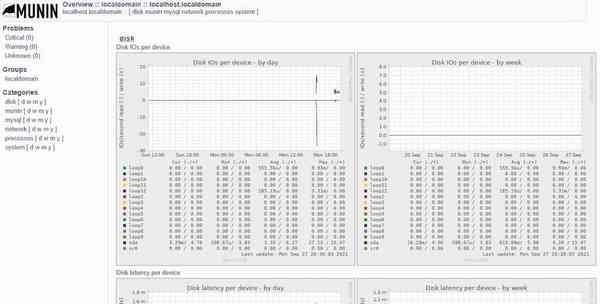

感谢您使用本教程在 Ubuntu 20.04 LTS Focal Fossa 系统上安装 Munin 服务器监控。如需更多帮助或有用信息,我们建议您查看Munin 官方网站。