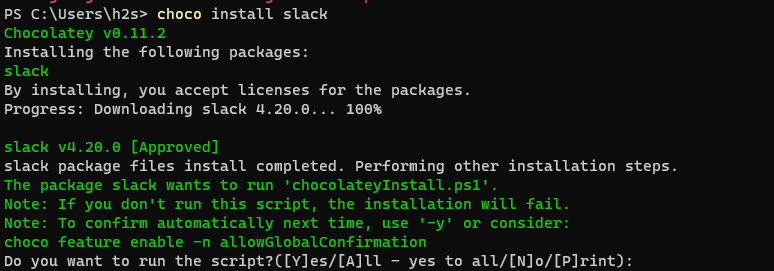
在 Windows 11 或 10 上下载和安装 Slack 的命令
在 Windows 11 或 10 上安装 Slack 的命令
尽管可以通过 Microsoft Store 或直接从其官方网站下载适用于 Windows 的 Slack 可执行安装程序来安装 Slack。但是,对于那些有兴趣使用命令行终端执行相同操作的人,这里是要遵循的步骤。
#第一种方法:
使用 Winget 命令行下载 Slack
Windows 10 和 11 已经有一个 Microsoft 创建的名为Winget 的包管理器。我们可以使用命令行界面安装各种流行的软件包或应用程序。因此,要在 Slack 安装中使用相同的内容,请按照以下步骤操作。
1. 运行 Windows 终端或 PowerShell
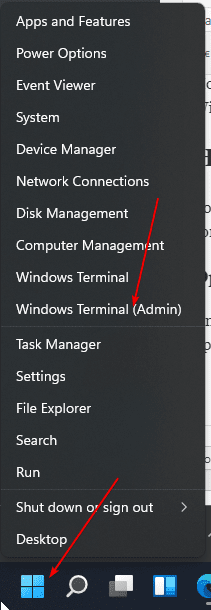
根据您的操作系统运行默认的命令行应用程序。为此,只需右键单击 Windows 开始按钮并选择PowerShell(管理员)或Windows 终端(管理员)。
2. 检查 Winget
最新版本的 Windows 10 已经有 Winget,但是,如果没有,那么只需转到Github页面并下载其安装程序。或者,您可以查看我们的Winget 文章。在的Windows 11用户不需要做任何事情,因为他们已经有了自己的系统上这个包管理器开箱。
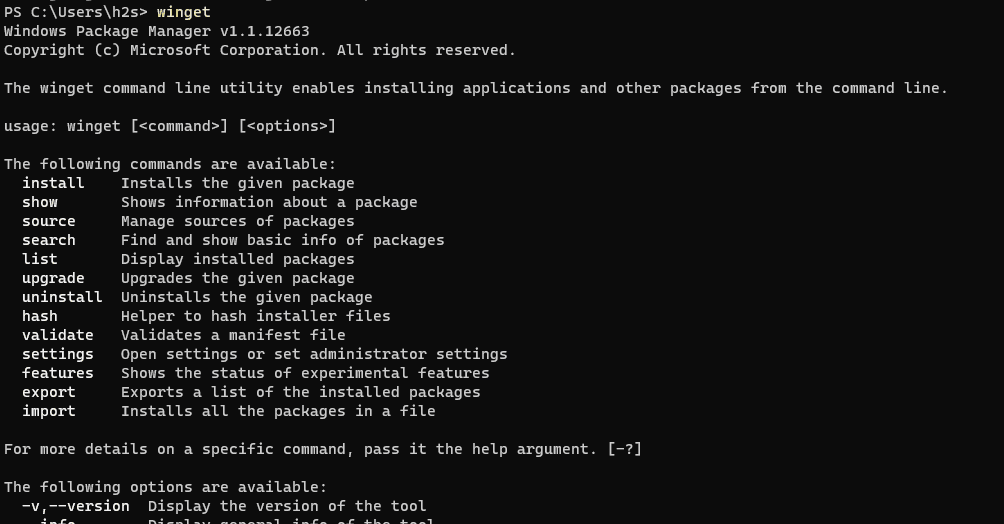
只需键入以下命令即可在命令终端上检查其可用性:
winget

3. 在 Windows 10 或 11 上安装 Slack 命令
现在,我们只需要运行以下命令即可使用命令行安装 Slack 应用程序。
winget install Slack\\SlackTechnologies.Slack
当它要求您同意条款时,输入A并按Enter键。
输出:
PS C:\\Users\\h2s> winget install Slack\\SlackTechnologies.Slack
Found Slack [9WZDNCRDK3WP] Version Unknown
This package is provided through Microsoft Store. winget may need to acquire the package from Microsoft Store on behalf of the current user.
Version: Unknown
Publisher: Slack Technologies Inc.
Publisher Url: https://www.slack.com
Publisher Support Url: https://get.slack.help/hc/en-us
Description: Slack brings team communication and collaboration into one place so you can get more work done, whether you belong to a large enterprise or a small business. Check off your to-do list and move your projects forward by bringing the right people, conversations, tools, and information you need together. Slack is available on any device, so you can find and access your team and your work, whether you’re at your desk or on the go.

Use Slack to:
• Communicate with your team and organize your conversations by topics, projects, or anything else that matters to your work
• Message or call any person or group within your team
• Share and edit documents and collaborate with the right people all in Slack
• Integrate into your workflow, the tools and services you already use including Google Drive, Salesforce, Dropbox, Asana, Twitter, Zendesk, and more
• Easily search a central knowledge base that automatically indexes and archives your team’s past conversations and files
• Customize your notifications so you stay focused on what matters

Scientifically proven (or at least rumored) to make your working life simpler, more pleasant, and more productive. We hope you’ll give Slack a try.

Stop by and learn more at: https://slack.com/
License: ms-windows-store://pdp/?ProductId=9WZDNCRDK3WP
Privacy Url: https://slack.com/privacy-policy
Copyright: © Slack Technologies, Inc.
Agreements:
Category: Business
Pricing: Free
Free Trial: No
Age Ratings: 12
Terms of Transaction: https://aka.ms/microsoft-store-terms-of-transaction
Seizure Warning: https://aka.ms/microsoft-store-seizure-warning
Store License Terms: https://aka.ms/microsoft-store-license

The publisher requires that you view the above information and accept the agreements before installing.
Do you agree to the terms?
[Y] Yes [N] No:
#2 方法:
那些不想使用Winget或已经在其 Windows 7/10/11 操作系统上安装Chocolatey的用户;他们可以使用它。或者按照下面给出的命令首先安装第三方包管理器 – Choco然后是Slack。
运行 PowerShell(管理员)或 Windows 终端(管理员)
就像我们在上面所做的那样,以同样的方式,右键单击 Windows开始按钮并在管理权限下运行命令行应用程序。
安装 Chocolatey Choco(如果你没有)
接下来,将下面给出的命令复制粘贴到您的 Powershell 或终端应用程序中以安装 Chocolatey 包管理器。
Set-ExecutionPolicy Bypass -Scope Process -Force; [System.Net.ServicePointManager]::SecurityProtocol = [System.Net.ServicePointManager]::SecurityProtocol -bor 3072; iex ((New-Object System.Net.WebClient).DownloadString(‘https://community.chocolatey.org/install.ps1’))
关闭并打开命令行应用程序
运行上述命令安装 Choco 包管理器后,关闭 PowerShell 或终端应用程序并再次打开它。
在 Windows 上使用 Choco 安装 Slack
现在,我们可以使用流行的choco 包管理器来安装这个消息和协作平台。
choco install slack
输出: