

如何在 Ubuntu 20.04 LTS 上安装 FireBird
admin
2023-07-31 10:15:39
0次
Firebird 是一个关系数据库,它提供了许多可在 Linux、Windows 和各种 Unix 平台上运行的 ANSI SQL 标准功能。Firebird 支持应用程序和触发器,以及许多 ANSI SQL 标准功能。其多代设计支持同时进行 OLTP(在线事务处理)和 OLAP(在线分析处理)活动。
在 Ubuntu 20.04 LTS Focal Fossa 上安装 FireBird
步骤 1. 首先,通过apt在终端中运行以下命令确保所有系统包都是最新的。
sudo apt update
sudo apt upgrade
步骤 2. 在 Ubuntu 20.04 上安装 FireBird。
默认情况下,FireBird 在默认的 Ubuntu 存储库中可用。运行下面的命令来安装它:
sudo apt install firebird-server
在安装过程中,系统会提示您设置 Firebird 数据库密码,如下所示:
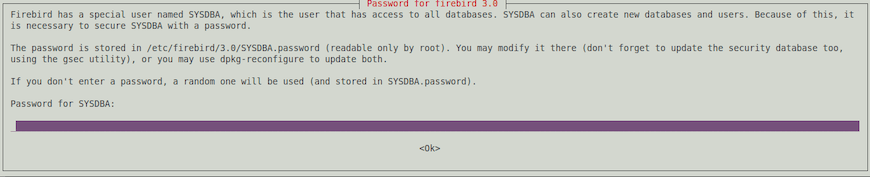

在您的系统上安装 Firebird 后,运行以下命令来更新安全数据库:
sudo dpkg-reconfigure firebird3.0-server
步骤 3. 配置 FireBird 数据库。
Firebird 可以从任何地方存储和访问您的数据库 SQLite 样式,但也可以限制它们的位置。运行以下命令进行编辑:firebird.conf
sudo nano /etc/firebird/3.0/firebird.conf
添加以下文件:
Database Paths/Directories#
# DatabaseAccess may be None, Full or Restrict. If you choose Restrict,
# provide \';\'-separated trees list, where database files are stored.
# Relative paths are treated relative to the root directory of Firebird.
# Default value \'Full\' gives full access to all files on your site.
# To specify access to specific trees, enum all required paths
# (for Windows this may be something like \'C:\\DataBase;D:\\Mirror\',
# for unix - \'/db;/mnt/mirrordb\'). If you choose \'None\', then only
# databases listed in databases.conf can be attached.
#
# Note: simple quotation marks shown above should *NOT* be used when
# specifying values and directory path names. Examples:
##Uncomment #DatabaseAccess = Full below by removing ## DatabaseAccess = None
# DatabaseAccess = Restrict C:\\DataBase
# DatabaseAccess = Restrict C:\\DataBase;D:\\Mirror
# DatabaseAccess = Restrict /db
# DatabaseAccess = Restrict /db;/mnt/mirrordbDatabaseAccess = Full
保存更改并关闭文件。然后,要应用更改,只需重新启动服务:
sudo systemctl restart firebird3.0
sudo systemctl enable firebird3.0
步骤 4. 创建 FireBird 数据库。
首先,使用以下命令登录 Firebird 数据库:
sudo isql-fb
我们继续使用以下语法创建新数据库:
CREATE DATABASE [\'database_path.fdb\'] USER [\'user\'] PASSWORD [\'your-password\'];
接下来,testdb使用用户“ ”和密码“ ”创建一个数据库“ ”:idroot-userYour-Strong-Password
CREATE DATABASE \'/home/godet/Documents/testdb.fdb\' USER \'idroot-user\' PASSWORD \'Your-Strong-Password\';
之后,连接到创建的数据库:
SQL> CONNECT \'/home/frank/Documents/testdb.fdb\' USER \'idroot-user\' PASSWORD \'Your-Strong-Password\';
Commit current transaction (y/n)?y
Committing.
Database: \'/home/godet/Documents/testdb.fdb\', User: idroot-user
感谢您使用本教程在 Ubuntu 20.04 LTS Focal Fossa 系统上安装 FireBird 数据库。如需更多帮助或有用信息,我们建议您查看FireBird 官方网站。
相关内容
热门资讯
Windows 11 和 10...
Windows 11/10 文件夹属性中缺少共享选项卡 – 已修复
1.检查共享选项卡是否可用
右键...
事件 ID 7034:如何通过...
点击进入:ChatGPT工具插件导航大全 服务控制管理器 (SCM) 负责管理系统上运行的服务的活动...
Radmin VPN Wind...
Radmin VPN 是一款免费且用户友好的软件,旨在牢固地连接计算机以创建一个有凝聚力的虚拟专用网...
Hive OS LOLMine...
目前不清退的交易所推荐:
1、全球第二大交易所OKX欧意
国区邀请链接: https://www.m...
Hive OS 新建飞行表的方...
目前不清退的交易所推荐:
1、全球第二大交易所OKX欧意
国区邀请链接: https://www.m...
如何在 Windows 11 ...
在对 Windows 注册表编辑器进行任何更改之前,强烈建议备份您的注册表设置。如果出现问题,您始终...
Hive OS 部署 PXE ...
目前不清退的交易所推荐:
1、全球第二大交易所OKX欧意
国区邀请链接: https://www.m...
如何在Instagram上扫描...
如何在Instagram上扫描名称标签/ QR?
总而言之,您可以通过大约四种不同的方法来扫描这些I...
Hive OS A卡超频VII...
目前不清退的交易所推荐:
1、全球第二大交易所OKX欧意
国区邀请链接: https://www.m...
如何修复 Steam 内容文件...
Steam 内容文件锁定是当您的 Steam 文件无法自行更新时出现的错误。解决此问题的最有效方法之...