

使用python下载新浪博客
7个月前的一篇todo-list:一个下载新浪博客工具的to-do list
今天终于可以说是完工了。
代码链接
主要的技术点:
- 使用urllib和urllib2获取网页内容
- 使用BeautifulSoup和re来解析网页内容
编码思路:
一、获取博文列表
我想要下载的目标博客:缠中说禅的博客
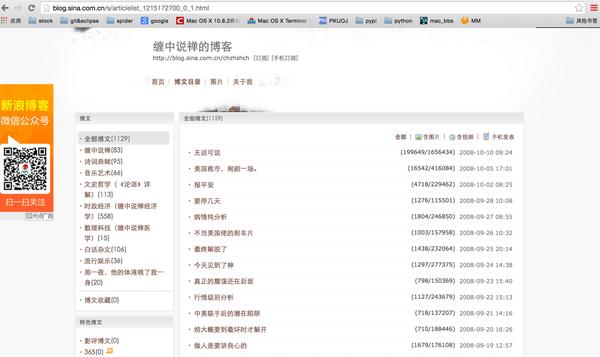
分析此博客,发现点击“博客目录”后可获取较调理的信息:
屏幕快照 2015-09-08 上午12.07.51.png
屏幕快照 2015-09-08 上午12.12.39.png
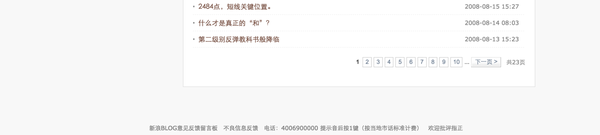
发现以下几点:
- 左侧有博文分类,可通过此处获取感兴趣的分类
- 下方有当前分类的所有博文所占的页数,可通过此处获得总工作量
class Spider:
def __init__(self, indexUrl):
self.indexUrl = indexUrl
content = indexUrl.split(\'/\')[-1].split(\'_\')
self.userID = content[1]
self.defaultPage = self.getPage(self.indexUrl)
def getPage(self, indexUrl):
\'\'\'获取indexUrl页面\'\'\'
request = urllib2.Request(indexUrl)
response = urllib2.urlopen(request)
return response.read().decode(\'utf-8\')
def getPageNum(self,page):
\'\'\'计算有几页博客目录\'\'\'
pattern = re.compile(\'\', re.S)
result = re.search(pattern, page)
if result:
print u\"目录有多页,正在计算……\"
pattern2 = re.compile(u\' .*?>共(.*?)页\', re.S)
num = re.search(pattern2, page)
pageNum = str(num.group(1))
print u\"共有\", pageNum, u\"页\"
else:
print u\"只有1页目录\"
pageNum = 1
return int(pageNum) 博客目录的URL(http://blog.sina.com.cn/s/articlelist_1215172700_0_1.html),
其中1215172700是用户ID,后面的0表示第一个分类“全部博文”,最后的1表示是次分类的第1页。
在Spider类初始化时将此URL解析,并传入getPage函数中,获取网页HTML。
用正则表达式(re)来解析HTML其实并不是个好方法,原因见这里:You can\’t parse [X]HTML with regex. Because HTML can\’t be parsed by regex. Regex is not a tool that can be used to correctly parse HTML.
在之后解析每篇博客内容时,re就无能为力了,我只好去使用BeautifulSoup,但是在前期我却是参考别的文章使用了正则表达。
在getPageNum函数中使用re来获取了当前分类的总页数。
然而我们刚开始的时候并不知道要选择哪个分类,所以要将这些信息显示出来供用户选择。
def getTypeNum(self):
    \'\'\'计算有几种分类\'\'\'
    pattern = re.compile(\'.*?(.*?).*?(.*?)\', re.S)
    result = re.findall(pattern, self.defaultPage)
    pattern2 = re.compile(u\'全部博文.*?(.*?)\', re.S)
    result2 = re.search(pattern2, self.defaultPage)
    self.allType = {}
    i = 0
    self.allType[i] = (self.indexUrl, u\"全部博文\", result2.group(1)[1:-1])
    for item in result:
        i += 1
        self.allType[i] = (item[0], item[1], item[2][1:-1])
    print u\"本博客共有以下\", len(self.allType), \"种分类:\"
    for i in range(len(self.allType)):
        print \"ID: %-2d  Type: %-30s Qty: %s\" % (i, self.allType[i][1], self.allType[i][2])
依然是使用re。在该函数中获取各分类对应的URL。
现在的流程梳理下就是这样的:
- 程序获取所有的博文分类
- 用户选择感兴趣的分类
- 程序获取该分类的URL和页数
- 程序获取并解析每篇文章(下一章)
二、解析文章
首先会根据分类和页数,得到具体某一页的博文列表的URL。具体规则上面已提到。然后需要将此页中的所有博客的URL解析出来。
def getBlogList(self,page):
\'\'\'获取一页内的博客URL列表\'\'\'
pattern = re.compile(\'.*?(.*?)\', re.S)
result = re.findall(pattern, page)
blogList = []
for item in result:
blogList.append((item[0], item[1].replace(\' \', \' \')))
return blogList
依然是使用re。
def mkdir(self,path):
isExist = os.path.exists(path)
if isExist:
print u\"名为\", path, u\"的文件夹已经存在\"
return False
else:
print u\"正在创建名为\", path, u\"的文件夹\"
os.makedirs(path)
def saveBlogContent(self,path,url):
\'\'\'保存url指向的博客内容\'\'\'
page = self.getPage(url)
blogTool = sinaBlogContentTool(page)
blogTool.parse()
filename = path + \'/\' + blogTool.time + \' \' + blogTool.title.replace(\'/\', u\'斜杠\') + \'.markdown\'
with open(filename, \'w+\') as f:
f.write(\"URL: \"+url)
f.write(\"标签:\")
for item in blogTool.tags:
f.write(item.encode(\'utf-8\'))
f.write(\' \')
f.write(\'\\n\')
f.write(\"类别:\")
f.write(blogTool.types.encode(\'utf-8\'))
f.write(\'\\n\')
picNum = 0
for item in blogTool.contents:
if item[0] == \'txt\':
f.write(\'\\n\')
f.write(item[1].encode(\'utf-8\'))
elif item[0] == \'img\':
f.write(\'\\n\')
f.write(\'\')
picNum += 1
print u\"下载成功\"
接下来就是解析博客,保存内容至本地。其中创建文件名时需要注意“/\\”此类符号,我的做法是将符号变为文字“斜杠”。
优于解析博客内容较为复杂,我创建一个class专门解析。
屏幕快照 2015-09-08 上午12.45.48.png
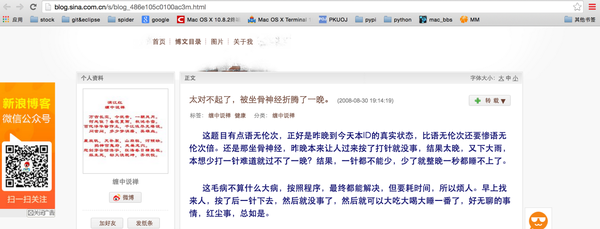
首先观察某篇博文,发现有以下几类关键信息:
- 博文题目:太对不起了,被坐骨神经折腾了一晚。
- 发表日期:2008-08-30 19:14:19
- 博文标签:缠中说禅 健康
- 博文分类:缠中说禅
- 博文本身:。。。。。。。。。。
由于博文较为复杂,只能使用BeautifulSoup进行解析。参考eautiful Soup 4.2.0 文档。
以上1至4均使用find函数:
find( name , attrs , recursive , text , **kwargs )
由于此4类的标签(tag)中的属性(attribute)较为特殊,所以均以此搜索。
class sinaBlogContentTool:
def __init__(self,page):
self.page = page
def parse(self):
\'\'\'解析博客内容\'\'\'
soup = BeautifulSoup(self.page)
self.title = soup.body.find(attrs = {\'class\':\'titName SG_txta\'}).string
self.time = soup.body.find(attrs = {\'class\':\'time SG_txtc\'}).string
self.time = self.time[1:-1]
print u\"发表日期是:\", self.time, u\"博客题目是:\", self.title
self.tags = []
for item in soup.body.find(attrs = {\'class\' : \'blog_tag\'}).find_all(\'h3\'):
self.tags.append(item.string)
self.types = u\"未分类\"
if soup.body.find(attrs = {\'class\' : \'blog_class\'}).a:
self.types = soup.body.find(attrs = {\'class\' : \'blog_class\'}).a.string
self.contents = []
self.rawContent = soup.body.find(attrs = {\'id\' : \'sina_keyword_ad_area2\'})
for child in self.rawContent.children:
if type(child) == NavigableString:
self.contents.append((\'txt\', child.strip()))
else:
for item in child.stripped_strings:
self.contents.append((\'txt\', item))
if child.find_all(\'img\'):
for item in child.find_all(\'img\'):
if(item.has_attr(\'real_src\')):
self.contents.append((\'img\', item[\'real_src\']))
博文本身比较复杂,因为不仅包含文字,还有图片。所以使用children属性,可以遍历Tag或BeautifulSoup对象的子项。
如果子项为NavigableString对象(即为字符串),则直接保存它本身。
否则,使用stripped_strings属性,将子项中的所有NavigableString对象均保存下来。同时,判断该子项中是否有属性为‘img’的Tag对象,若有,则取该Tag的real_src属性保存下来。
这样文字和图片都获取到了。
最后,在Spider类中使用run函数将以上内容都串起来:
def run(self):
self.getTypeNum()
i = raw_input(u\"请输入需要下载的类别ID(如需要下载类别为“全部博文”类别请输入0):\")
page0 = self.getPage(self.allType[int(i)][0])
pageNum = self.getPageNum(page0)
urlHead = self.allType[int(i)][0][:-6]
typeName = self.allType[int(i)][1]
typeBlogNum = self.allType[int(i)][2]
if typeBlogNum == \'0\':
print u\"该目录为空\"
return
self.mkdir(typeName)
for j in range(pageNum):
print u\"------------------------------------------正在下载类别为\", typeName, u\"的博客的第\", str(j+1), u\"页------------------------------------------\"
url = urlHead + str(j+1) + \'.html\'
page = self.getPage(url)
blogList = self.getBlogList(page)
print u\"本页共有博客\", len(blogList), u\"篇\"
for item in blogList:
print u\"正在下载博客《\", item[1], u\"》中……\"
self.saveBlogContent(typeName, item[0])
print u\"全部下载完毕\"
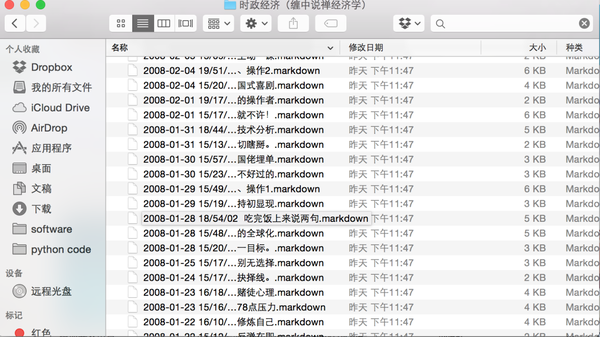
以下是成果展示:
屏幕快照 2015-09-08 上午1.03.03.png
相关内容