

那些年在selenium中踩过的坑
admin
2023-07-30 21:13:14
0次
1.selenium 在打开firefox后,发现程序‘死’那里了,不动了,后面的代码不执行,最后抛出异常说超时。
-
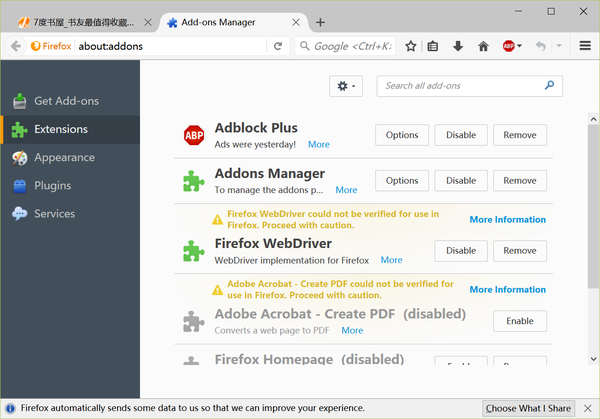
原因:这个主要原因selenium在运行时会在firefox中安装一个Firefox WebDriver的插件,如果firefox版本太高,比如最新的FF48版本,在48版本中,对于安装的插件要进行验证,没有经过验证的插件不会被运行,而且通过在firefox中输入
about:config,设置xpinstall.signatures.required为true,同样也无法生效。
-
解决方案:很简单,用低版本的firefox把,比如firefox45,当然也请跟踪selenium的开发进度,目前正有个geckodriver的新版本开发过程中,不过当前这个时间点最好的办法是降低你的firefox版本。目前为止47.01是可以用的。
(请注意,本条记录时间为2016-08-07) - 上代码便于说清楚,以下代码是正确无任何问题
#coding=utf-8
#运行环境配置
#主要配置firefox的profile文件是否可用

import os
import sys
from selenium import webdriver
from selenium.common.exceptions    import NoSuchElementException
gourl=\'http://www.baidu.com/\'
#获得webdriver函数
def get_webdriver():
    #定制firefox的profile文件
    profileDir = r\"d:\\xiaoshuo\\profile\"
    profile1 = webdriver.FirefoxProfile(profileDir)
    #亲们重点关注这句就好,其他更多的不用关心
    br=webdriver.Firefox(profile1)
    br.set_window_size(600,600)
    return br
br=get_webdriver()
br.get(gourl)2.在使用find_element_by_xxxx()查找元素时,如果元素找不到,不会返回None,而是抛出异常,你必须得自己捕获异常
from selenium import webdriver
from selenium.common.exceptions    import NoSuchElementException
br=webdriver.Firefox()
gourl=\'http://www.baidu.com/\'
br.get(gourl)
try:
    xiaoyiye=br.find_element_by_link_text(u\'下一页\')
    #找到要做的事情
except NoSuchElementException:
    #找不到异常处理
print \"no next page\"3.selenium启动firefox,如果不指定profile文件,将只能使用firefox默认配置,无法进行浏览器定制,比如不显示图片,启动广告插件等,你必须得自己配置profile,让selenium用指定配置启动
from selenium import webdriver
from selenium.common.exceptions    import NoSuchElementException
profileDir = r\"G:\\myproject\\python\\xiaoshuo\\profile\"
profile1 = webdriver.FirefoxProfile(profileDir)
time.sleep(1)
br=webdriver.Firefox(profile1)
gourl=\'http://www.baidu.com\'
br.get(gourl)4.在使用firefox的 profile文件后,你会发现很多选项虽然在浏览器中进行了设置但是在通过selenium启动firefox的时候很多设置没有生效,所以你还得必须会通过代码进行配置设置来关闭图片
profileDir = r\"G:\\myproject\\python\\xiaoshuo\\profile\"
profile1 = webdriver.FirefoxProfile(profileDir)
profile1.set_preference(\'permissions.default.stylesheet\', 2)
profile1.set_preference(\'permissions.default.image\', 2)
profile1.set_preference(\'dom.ipc.plugins.enabled.libflashplayer.so\', \'false\')
br=webdriver.Firefox(profile1)
gourl=\'http://www.duzheba.cc/\'
br.get(gourl)
5. 用标签页代替弹出窗口无法设置成功
- 在python使用selenium来操控firefox的时候,有时候希望所有的新开窗口用TabPage来代替,但是如果你以为通过设置firefox的profile文件目录,或者在代码中通过
profile1.set_preference(\'browser.link.open_newwindow\',3)来搞定,那么你会发现你启动的窗口永远browser.link.open_newwindow的值永远等于2,也就是下图中的“需要新建窗口时以新建标签页代替”选项永远是没有选中的,除非手动点击一下。
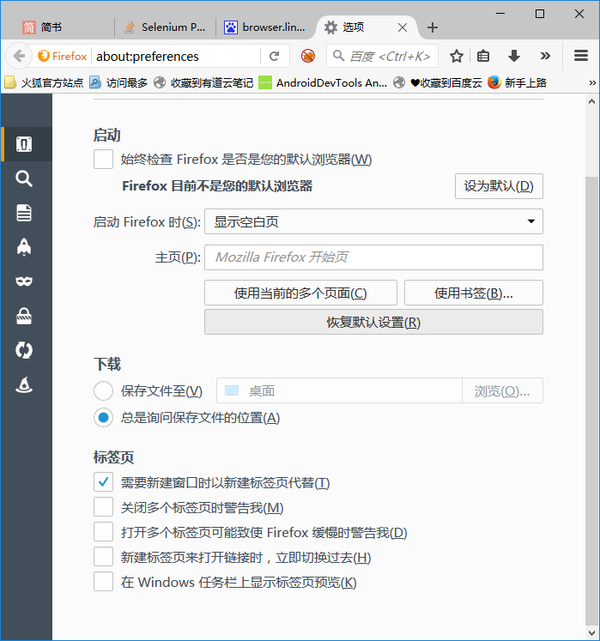
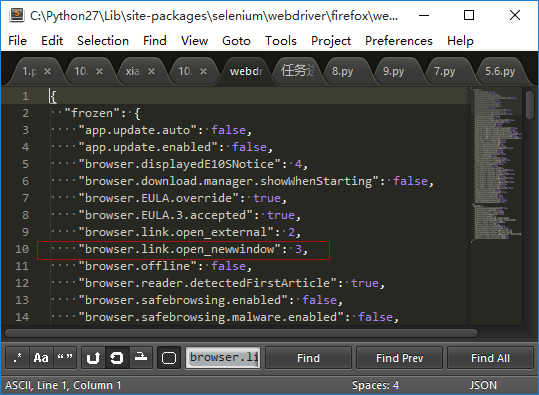
标签页选项- 原因:,因为selenium的绑定中已经将这个选项写成了固定值,所以无论你如何设定除非在窗口启动后手动点击,否则该项用户按不会选中。而该问题的解决在于直接手动改写selenium代码中的设置,具体方法如下:
- 确定目录,在我的机器上是
C:\\Python27\\Lib\\site-packages\\selenium\\webdriver\\firefox,大家可以根据自己的机器情况进行调整 - 编辑器打开目录中的
webdriver_prefs.json文件,将browser.link.open_newwindow的值修改为3。
6.在firefox中,如果通过Tab page方式打开了多个页面,这时使用driver.window_handles来获得窗口句柄,你会发现永远都只有一个handle,完全无法通过driver.switch_to_window(handle)来切换Tab页面
-
雷人的原因:在firefox中,除非你用的是开发版,否则Tab page是无法获得窗口句柄的,也就是虽然在firefox中打开了多个Tab Page,但是通过
driver.window_handles获得的句柄永远是1.而同样,如果是在chrome中,将可以获得多个句柄。 - 解决方案 自己通过发送快捷键进行Tab 页面切换吧。
#coding=utf-8
#tab页面切换测试

from selenium import webdriver
from selenium.webdriver.common.keys import Keys
import time

driver = webdriver.Firefox()
try:
    driver.get(\"http://www.baidu.com\")
    print driver.title
    #新建TAB页面
    driver.find_element_by_tag_name(\'body\').send_keys(Keys.CONTROL + \'t\')
    driver.get(\"http://www.qq.com\")
    print driver.title
    #要关闭当前Tab页用的快捷键
    #driver.find_element_by_tag_name(\'body\').send_keys(Keys.CONTROL + \'w\')
    #多Tab页面切换
    driver.find_element_by_tag_name(\'body\').send_keys(Keys.CONTROL + Keys.TAB)
    print driver.title
    #driver.close()
except Exception as e:
print e下一篇:最简便的爬虫效率提升方法
相关内容
热门资讯
500 行 Python 代码...
语法分析器描述了一个句子的语法结构,用来帮助其他的应用进行推理。自然语言引入了很多意外的歧义,以我们...
定时清理删除C:\Progra...
C:\Program Files (x86)下面很多scoped_dir开头的文件夹 写个批处理 定...
65536是2的几次方 计算2...
65536是2的16次方:65536=2⁶
65536是256的2次方:65536=256
6553...
scoped_dir32_70...
一台虚拟机C盘总是莫名奇妙的空间用完,导致很多软件没法再运行。经过仔细检查发现是C:\Program...
Mobi、epub格式电子书如...
在wps里全局设置里有一个文件关联,打开,勾选电子书文件选项就可以了。
Prometheus+Graf...
一,Prometheus概述
1,什么是Prometheus?Prometheus是最初在Sound...
python绘图库Matplo...
本文简单介绍了Python绘图库Matplotlib的安装,简介如下:
matplotlib是pyt...
pycparser 是一个用...
`pycparser` 是一个用 Python 编写的 C 语言解析器。它可以用来解析 C 代码并构...
小程序支付时提示:appid和...
[Q]小程序支付时提示:appid和mch_id不匹配
[A]小程序和微信支付没有进行关联,访问“小...
python文件操作相关知识点...
本文汇总了python文件操作相关知识点。分享给大家供大家参考,具体如下:
总是记不住API。昨晚写...